
golf simulator
Golf Simulator Projector Shadow: Three Mounting Positions That Remove It
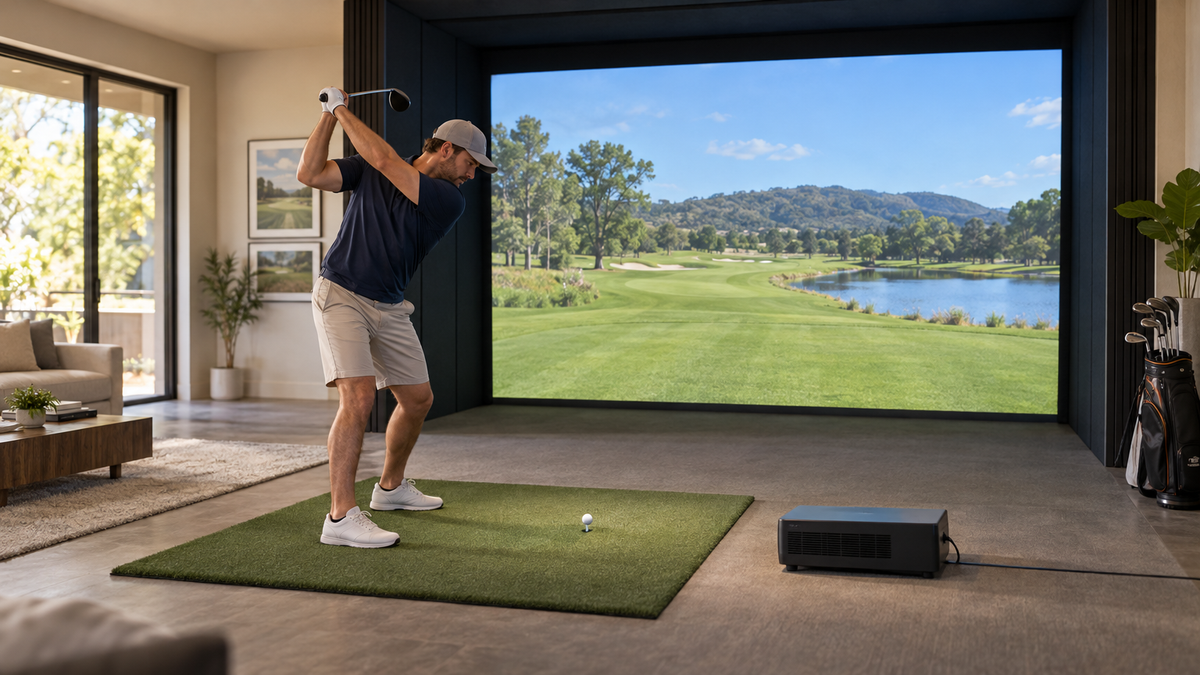
The shadow on your screen is not a defective projector. It is geometry, and it appears the moment a golfer stands between the lens and the image. If you are staring at a dark silhouette of yourself on the fairway, you are looking at a golf simulator projector shadow, and it has exactly one cause and three clean fixes.
The beam travels in a straight line from lens to screen. Anything in that line blocks it. Move the lens so the line never passes through the swing zone, and the shadow is gone for good.
Why the Shadow Happens in the First Place
A standard ceiling mount puts the projector directly above the golfer or slightly behind, then aims it forward and down. That works fine for a living room movie. In a sim bay, your head and shoulders sit right in the beam as you address the ball.
Software cannot fix this. Neither can a brighter bulb. The only answer is changing where the light starts, so the golfer is never between the lens and the screen.
Which Golfers Get Hit Hardest
Taller players block more light. So do builders who mount the projector low and close to the hitting area. If golfers of both handedness use the bay, a projector pushed off to one side makes it worse for one of them.
Want the shadow fix that needs no ceiling work? A low projector cabinet sitting ahead of the tee does it.
Shop the Floor Enclosure for ProjectorsFix One: Overhead Offset Mount Behind the Golfer
This is the classic approach. The projector hangs from the ceiling behind and above the hitting area, high enough that the beam passes over the golfer's head and lands on the screen.
BenQ says a throw ratio of 0.69 to 0.89 suits most golf simulator setups, with the projector mounted above and behind the hitting area. (Source: BenQ, Best Place to Mount a Golf Simulator Projector) That ratio range lets you place the lens close enough to the screen that the beam clears your head instead of grazing it.
You need real ceiling height for this to work. If you are not sure what your room allows, the room size requirements for a 10 foot ceiling guide lays out the swing clearance you have to protect before you add anything overhead.
Mount Hardware Matters
A projector that sags or drifts after a month will bring the shadow back. A solid fixed mount such as the Carl's Place Flush-Mount Projector Mount keeps the lens exactly where you aimed it. Check the current price on the product page.
Fix Two: Short Throw Projector Ahead of the Tee
Flip the whole idea. Put the projector in front of the golfer, between the hitting mat and the screen. The light travels away from you, so there is nothing to block it.
This needs a short throw lens because the projector sits so close to the screen. Floor-mounted projectors need a very short throw ratio, often about 0.5, and Golfers' Authority puts the projector 8 to 10 feet from the hitting area. (Source: BenQ and Golfers' Authority, Floor or Ceiling Mount?)
Short throw optics also have a built-in upward offset, about 12 degrees on BenQ's AH500ST. (Source: BenQ knowledge center) That offset is why a low projector can still throw the image high on the screen without any shadow.
If you want a BenQ short throw model from our catalog, start with the BenQ AH30ST Golf Simulator Projector, or step up to the BenQ LK830ST 4K Golf Simulator Projector if you want 4K detail. Not sure whether short or long throw fits your room? Our short throw vs long throw comparison walks through it.
Fix Three: The Floor Enclosure
A floor enclosure is the same ahead-of-the-tee idea in a tidier package. The projector lives in a low cabinet near the screen, protected from stray balls and out of the swing path. The cabinet also keeps the lens aimed consistently, so you do not re-aim it every few weeks.
The tradeoff is keystone. A floor-mounted projector tilts, which makes a trapezoid image that needs keystone correction. (Source: BenQ knowledge center, floor mount guide) Take a minute during setup to level the unit and let the lens offset do the work, rather than leaning on heavy digital correction.
For a deeper side-by-side of hanging versus standing, see our ceiling mount vs floor stand breakdown.
By the Numbers
Three numbers decide which fix suits your room: throw ratio, distance, and brightness. Throw ratio tells you how far back the lens must sit for a given image width, and it is simply distance divided by image width. Our throw distance calculator guide covers the formula in full.
Projector distance from screen for a 10 ft wide image, by throw ratio
Source: Throw ratio formula (distance = throw ratio x image width), using ratios from BenQ specs. The 1.5 figure is a typical standard throw lens.
Brightness does not change with the mount. Retailers recommend at least 3,000 lumens for a 10 foot wide screen, and 4,000 or more with ambient light. (Source: BenQ guidance) BenQ pairs a 3,000 lumen projector at a 0.69 to 0.83 throw with a 10 by 13 foot 4:3 screen. (Source: BenQ golf sim projector Q&A) If you are deciding how much light you actually need, our guide on how many lumens for a golf impact screen has the ranges by room.
Mounting positions that remove the golfer's shadow
Swipe to compare →
| Position | Typical throw ratio | How it avoids the shadow |
|---|---|---|
| Overhead offset (ceiling mount behind and above the golfer) | 0.69 to 0.89 (BenQ) | Beam passes above the golfer's head |
| Short throw ahead of the tee (floor or stand) | About 0.5 (BenQ) | Projector sits in front of the golfer, 8 to 10 ft from the hitting area (Golfers' Authority) |
| Floor enclosure or cabinet | About 0.5 (BenQ) | Projector is housed low and forward, and the built-in upward offset aims the image high (BenQ) |
| Side cart or tripod | Varies | No mount needed, but shadow risk is highest when golfers of both handedness hit (BenQ) |
Which Position Should You Pick?
Match the fix to your room, not to what looks coolest in a photo.
- Tall ceiling, room behind the golfer: overhead offset. Cleanest look, no floor footprint.
- Low ceiling or a room you cannot drill: short throw ahead of the tee.
- Shared space, kids, stray shots: floor enclosure. It protects the lens and holds alignment.
Whichever you choose, aim the lens before you tension the screen, then do a few full swings with a friend watching the image from the side. If any part of the picture flickers dark during your swing, nudge the position until the beam clears you completely.
Planning the whole bay at once? You can Build your simulator in 3D and see exactly where the projector, screen and hitting area sit before you buy a single mount.
Stop Playing in Your Own Shadow
A clean image is worth the extra hour of planning. Pick a position that keeps the beam off your body, match the lens to the distance, and the picture stays bright from first swing to last.
Ready to lock in the whole setup? Browse our golf simulator packages and get a bay designed around a shadow-free projector from day one.
Shop the Gear
Impact Screens we recommend


Not sure which simulator fits your room?
The two-minute 3D Simulator Builder checks your space and budget against every system we carry.

Keep Reading
Related guides

golf simulatorGolf Simulator Ceiling Protection: Baffle vs Net vs Padding for Skied Shots

golf simulatorGolf Simulator Hitting Bay Budget Planner for a One-Car Garage: What to Buy First and What to Defer

DIY golf simulator build timeGolf Simulator Enclosure Build Timeline: Weekend Build vs a Week of Evenings