
golf simulator
Golf Simulator Projector Ceiling Mount vs Floor Stand: Which Setup Is Right for Your Bay?
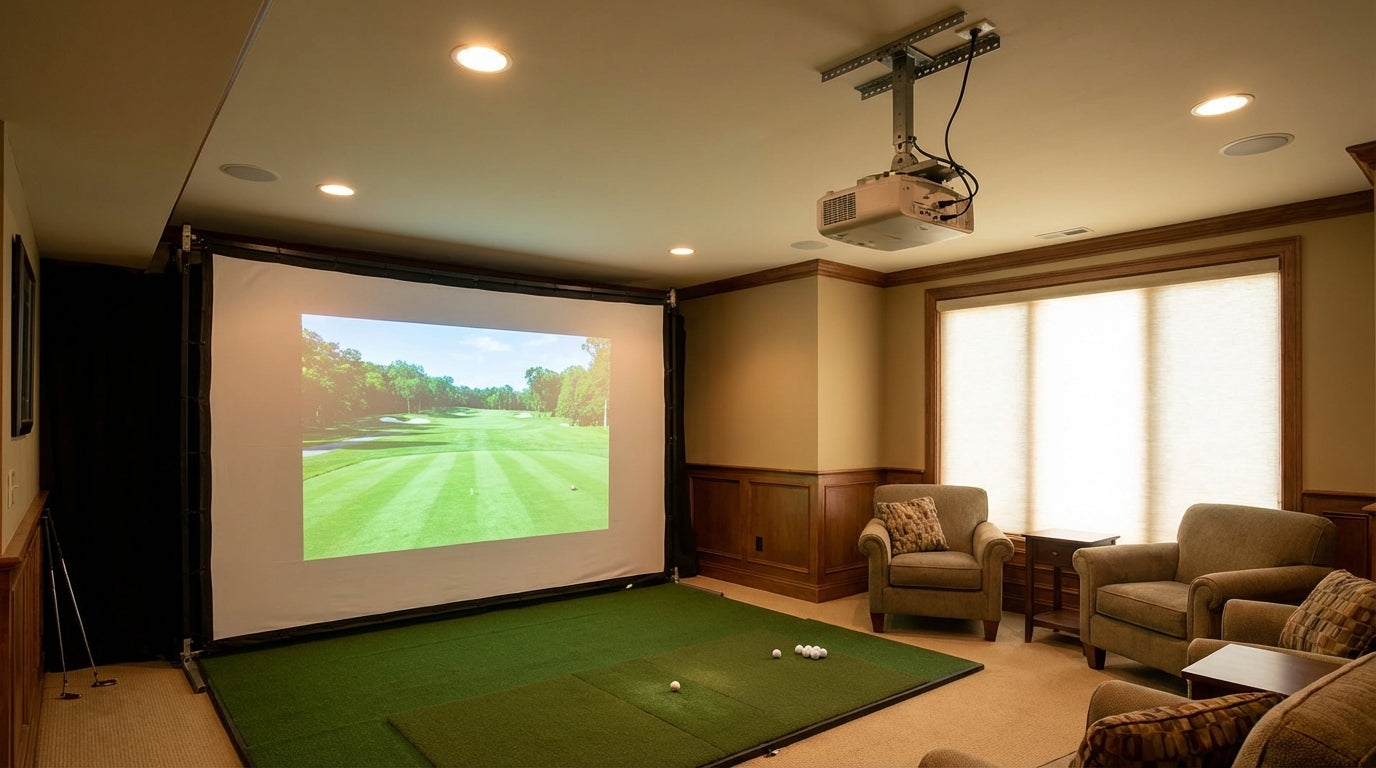
Here's something most projector guides skip entirely: digital keystone correction beyond 5–10 degrees measurably degrades resolution, brightness, and can even introduce input lag. (Source: BenQ Golf Simulator Projector Resources / MyGolfSimulator Keystone Guide) That matters a lot when you're trying to read a 3-iron trajectory on a 10-foot impact screen. And it's directly relevant to the golf simulator projector ceiling mount vs floor decision — because a badly angled ceiling mount in a low-ceiling room forces exactly that trade-off.
You've already picked your projector. You know your throw ratio. Now you need to figure out where the thing actually lives in your bay — hung from above or sitting on the floor. The answer hinges on your room dimensions, your projector type, and one number most builders forget to check before they pour concrete anchors.
Ceiling Mount vs Floor Mount: Why This Decision Matters More Than You Think
The projector mount isn't just a physical install question. It determines image geometry, cable routing strategy, swing safety, and whether your projector survives a shank off the bottom edge of the screen.
Two specs define which direction you go: ceiling height and throw ratio. If you haven't confirmed both, stop here. Our guide on ceiling height requirements for a golf simulator home setup has the exact numbers — it's worth a read before you buy a bracket.
Free tool — 30 seconds
Where should your projector go?
Pick your projector and screen size — get the exact mounting distance, image size, and brightness for your build. No math required.
Open the projector calculator →The Case for Ceiling Mounting
Image Quality from the Top Down
A ceiling-mounted projector positioned correctly doesn't need heavy keystoning. It's roughly on-axis with the screen, which means you're getting the full resolution and brightness the spec sheet promised. The practical ceiling-mount sweet spot is 8–14 feet from the screen. Under 8 feet and you're risking a ball strike on a driver. Beyond 14 feet and your shadow starts creeping into frame on long follow-throughs. (Source: Carl's Place Blog / BenQ Golf Simulator Projector Guide)
That 6-foot placement window sounds generous until you map it against your actual room depth. Run a tape measure before ordering hardware.
Swing Safety — The Real Reason Most Builders Go Up
A projector on the floor, even inside a protective enclosure, is in the blast zone. One pushed driver that clips the bottom edge of the screen, one equipment shuffle — that's a dead projector. A ceiling-mounted unit is completely out of the shot path. No enclosure needed, no anxiety about it, ever.
Floor-mount protective enclosures retail between $299 and $449 — a required add-on cost that ceiling-mount setups avoid entirely. (Source: Rain or Shine Golf / G-Trak / Indoor Golf Outlet, 2026) That single line item often closes the price gap between a quality ceiling bracket with a proper cable run versus a floor-stand setup with enclosure.
The Case for Floor Mounting
When Your Projector Doesn't Give You a Choice
Ultra-short-throw projectors — anything below a 0.4:1 throw ratio — are essentially locked into floor placement. The optics are engineered to sit close to the screen and shoot up at a steep angle, which only works with the unit positioned at roughly screen-center height on a floor stand or purpose-built enclosure. (Source: MyGolfSimulator / Rain or Shine Golf Buyer's Guide / Top Shelf Golf)
If you're running a UST projector, ceiling mounting isn't a realistic option. You'll fight severe distortion that no amount of keystone correction fixes cleanly. For throw ratios between 0.5 and 1.1 — the sweet spot for most simulator builds — both options are genuinely on the table.
Low Ceilings Force the Issue
Rooms under 9 feet of ceiling height don't give you safe ceiling-mount geometry. The projector ends up too close to the screen, the throw angle gets steep, and you're right back to heavy keystone correction eating into your image quality. The minimum recommended ceiling height for a golf simulator is 9 feet absolute minimum, with 10 feet considered the practical optimum for comfortable driver swings. (Source: Rapsodo Golf / Carl's Place / IndoorGolfDesign)
In an 8-foot garage bay, a floor-mounted projector with an enclosure isn't a compromise — it's simply the right tool for the constraint.
By the Numbers
Here's the data that actually drives this decision:
- Ceiling height floor for ceiling mounting: 9 ft absolute minimum, 10 ft practical optimum for full swing clearance — rooms under this threshold push you to floor mount regardless of preference. (Source: Rapsodo Golf / Carl's Place / IndoorGolfDesign)
- Safe placement window from screen: 8–14 ft — under 8 ft risks ball strike damage to the unit, beyond 14 ft risks shadow intrusion on follow-through. (Source: Carl's Place Blog / BenQ Golf Simulator Projector Guide)
- Enclosure cost avoided by ceiling mounting: $299–$449 — not optional for floor mounts, which makes ceiling mount the cheaper long-run option in rooms where it's feasible. (Source: Rain or Shine Golf / G-Trak / Indoor Golf Outlet, 2026)
- Optimal throw ratio for either mount: 0.5–1.1, with 0.8:1 widely cited as ideal; UST projectors below 0.4:1 are floor-only. (Source: MyGolfSimulator / Top Shelf Golf)
- HDMI cable run limit for passive cables: 15–20 ft — ceiling mounts in rooms 16+ ft deep often need active HDMI or fiber, adding $50–$150 to installation. (Source: Top Shelf Golf Projector Setup Guide)
Ceiling Mount vs Floor Mount — Key Factor Scores (1–10)
Source: Industry estimates based on Carl's Place, BenQ, MyGolfSimulator, Top Shelf Golf guidance
Which Mount Is Right for Your Room?
The table below maps room type to the recommended mount — no guesswork required:
Recommended Projector Mount by Room Type & Ceiling Height
Swipe to compare →
| Room Type / Ceiling Height | Recommended Mount | Key Reason |
|---|---|---|
| Basement ≥10 ft ceiling | Ceiling mount | Full clearance for swing + throw distance; clean cable run through joists |
| Garage with 9–10 ft ceiling | Ceiling mount (short throw 0.5–0.8:1) | Adequate but tight — use short-throw to keep projector close and minimize keystone |
| Garage or bonus room 8–9 ft ceiling | Floor mount with enclosure | Too low for safe ceiling mount; UST or short-throw on floor at screen-center height |
| Dedicated sim room ≥10 ft, vaulted | Ceiling mount with lens shift projector | Vaulted angle requires optical lens shift — not digital keystone — to preserve image quality |
| Temporary / portable setup (any height) | Floor mount with enclosure | No permanent install; enclosure protects unit and cables tuck under the mat |
| Commercial bay or high ceiling ≥12 ft | Ceiling mount, standard throw 0.8–1.1:1 | Extra height allows greater throw distance and eliminates shadow risk entirely |
The Hidden Cost: Cable Runs
Floor mounts are simple — HDMI from the projector to your PC, tucked under the mat or along the baseboard. Ceiling mounts require actual planning: conduit or raceways through the ceiling, a drop to your PC location, and a run that's often longer than it looks on paper.
Standard passive HDMI cables hold signal reliably to 15–20 feet. A room that's 18 feet deep with a rear ceiling mount might need a 20-foot run — fine. Push past 22 feet and you're looking at an active HDMI cable or HDMI-over-fiber, adding $50–$150 to installation. (Source: Top Shelf Golf Projector Setup Guide) One-time cost, but plan for it before you seal the drywall.
The cable path decision also ties into how you handle power and network routing in the bay. If you haven't thought through that side yet, our golf simulator electrical setup guide covers surge protection and conduit planning in detail — and our WiFi and network setup guide explains why you want ethernet pulled to the ceiling while you're up there anyway.
The Final Call
Default to ceiling mount if you have 10+ foot ceilings and a standard or short-throw projector (0.5–1.1:1 throw ratio). You get better image geometry at the right placement distance, full swing safety, and no enclosure to budget for. The cable run requires planning but it's a one-time problem.
Floor mount when your ceiling is under 9 feet, you're running a UST projector, or you need a setup you can break down and move. Just budget for the enclosure — it's not optional, it's just the cost of doing business in a low bay.
And once your projector is dialed in, make sure it's hitting a screen built to take the shot. Browse our full lineup of impact screens — sized for every bay configuration, ceiling or floor mount alike.
Not sure which simulator fits your room?
The two-minute Simulator Finder Quiz checks your space and budget against every system we carry.
From This Guide
Projectors we recommend


Keep Reading
Related guides

golf simulatorGolf Impact Screen for a Two-Car Garage: How to Size, Center, and Hang One Across the Wide Bay

golf simulatorGolf Impact Screen Max Ball Speed Rating: What Your Screen Really Survives at 110+ MPH

corner setupGolf Simulator Impact Screen for a Corner Setup: How to Angle It Without Wrecking Your Bounce-Back