
golf simulator
What Color to Paint a Golf Simulator Room: Walls, Ceiling and Sheen for a Sharper Image
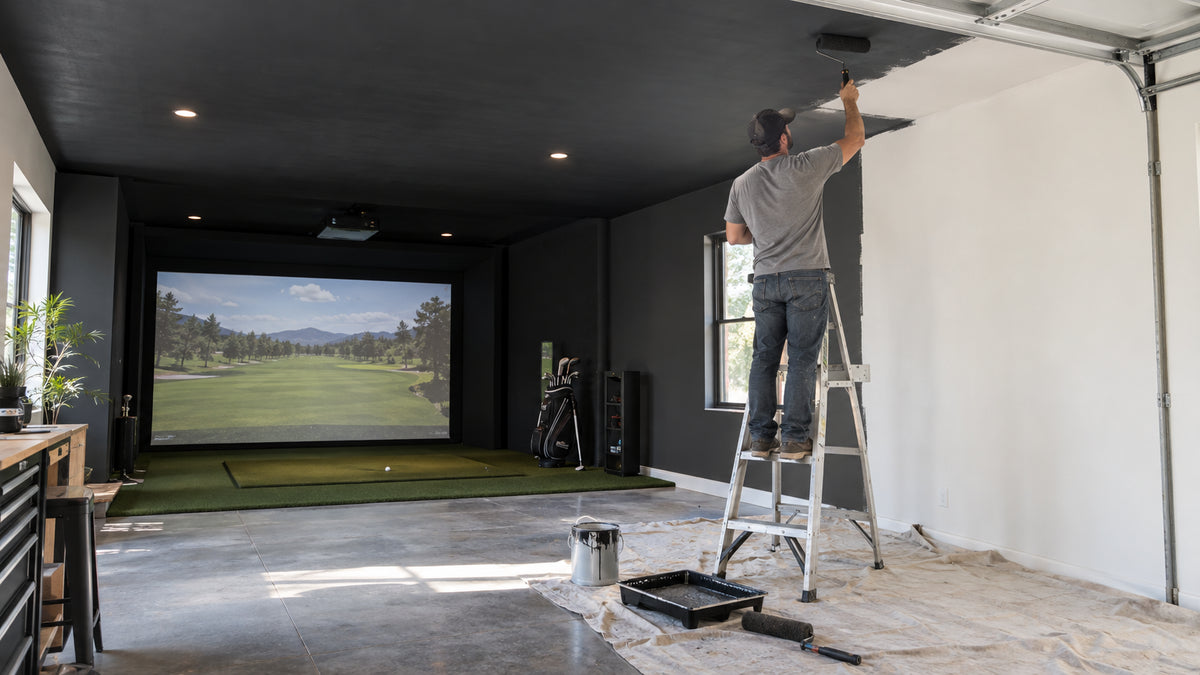
Picture two identical bays. Same projector, same screen, same launch monitor. One has white drywall and a white ceiling, the other has charcoal walls and a charcoal ceiling. Turn the projector on and the second room looks like it has a better projector. Only the paint changed.
So what color should you paint a golf simulator room? Go dark, go flat, and cover more than the wall behind the screen. The rest of this post covers why, which surfaces matter most, and how far the dark zone needs to reach.
Why Wall Color Changes the Picture
A projector does not only light the screen. Some of that light spills past the edges, bounces off the screen fabric toward the sides, and lands on every surface nearby. A white wall or ceiling throws a big share of it right back at your screen, raising the black level and flattening the image.
Dark surfaces swallow that spill. Blacks look blacker, colors look richer, and the fairway no longer looks like it was photographed through a haze.
Spec-sheet contrast will not save you
You might assume a high contrast rating on the projector box solves this. It does not. One projector measured at 190:1 against an advertised 100,000:1 figure (Source: RTINGS projector testing). Real contrast depends on the room, and the room is the one thing you fully control.
By the Numbers: What the Data Says
Paint is measured by light reflectance value, or LRV, on a 0 to 100 scale. Higher means more light bounced back into the room.
- Standard white paint sits around 82 to 90 LRV, while darker specialty projector paints land around 14 to 29 (Source: Smarter Surfaces projector paint comparison, July 2023).
- Flat latex is the usual recommendation for projection surfaces, and high gloss creates glare that makes the picture hard to watch (Source: ProjectorCentral painted screen test).
- Grey surfaces improve contrast in rooms with lower ambient light, while white gives the brightest image in rooms that cannot be darkened (Source: Smarter Surfaces projector screen buying guide).
- About 9 ft is the ideal ceiling height for a golf simulator, and anything lower is tight (Source: Ricoh USA golf simulator setup guide).
Approximate light reflectance value (LRV) by wall color (higher = more light bounced back)
Source: Smarter Surfaces projector paint comparison table (white and specialty paint, midpoint and upper bound of published ranges); Sherwin-Williams color chips (Iron Ore, Naval, approximate)
White returns roughly 14 to 20 times more light than the deepest navy and charcoal shades.
The Best Colors for a Golf Simulator Room
You do not need a special projector paint. Builders commonly reach for deep, low-sheen architectural colors such as Sherwin-Williams Iron Ore, Greenblack and Naval, or Benjamin Moore Hale Navy (Source: golfsimulatorforum.com build threads and the golferhive.com room colors guide).
Charcoal and near-black give the most contrast. Navy and green-black feel less like a cave while still killing reflections, which matters if the room doubles as a den.
Budget for two coats
Going dark over white drywall is rarely a one-coat job. One builder who used Iron Ore reported it needed two good coats. A gray-tinted primer first saves paint and a lot of patchy touch-ups.
Sheen: Flat Beats Everything Else
Color gets the attention, but sheen causes the hot spots. Eggshell, satin and semi-gloss all reflect a bit of the projector beam back at a sharp angle, and that shows up as glowing patches on the walls and a faint veil over the screen.
Use flat or matte on every wall and the ceiling. Flat paint scuffs a little easier, which is an acceptable trade in a room where nobody is rubbing against the walls.
How Far the Dark Zone Needs to Reach
Nobody has published a measured distance for this, so treat it as a practical guideline. The common builder approach is to paint the screen wall, both side walls and the ceiling from the screen back past the projector mount and out to the hitting area. If you can paint the whole room, do that.
Golf simulator room surfaces: color, sheen and dark-zone guidance
Swipe to compare →
| Surface | Recommended color and sheen | Dark zone extent (guideline) |
|---|---|---|
| Screen wall (around the screen) | Near-black or deep charcoal, flat/matte | Full wall, floor to ceiling |
| Side walls | Dark charcoal, navy or green-black, flat/matte | From the screen back to at least the hitting area |
| Ceiling | Dark, flat/matte (white ceilings bounce light onto the screen) | From the screen back past the projector mount |
| Back wall (behind the golfer) | Dark flat/matte preferred. Mid-tone acceptable if lights stay off. | Optional if the room is fully darkened during play |
| Floor / hitting area | Dark turf or mat, low-sheen | Matches the dark zone |
The ceiling matters most in low rooms
With a ceiling near that 9 ft mark, the projector sits close to a big flat surface. A white ceiling there acts like a bounce card aimed straight at your screen. If you only have energy for one surface beyond the screen wall, paint the ceiling dark first.
When You Cannot Go Fully Dark
Shared rooms and bright garages are real. If you need the lights on or the room has windows, a very dark scheme costs you less than you fear, because you are already fighting ambient light. Our guide to ambient light problems covers the trade-offs, and the LED lighting guide shows how to light the room for play without washing out the image.
A mid-gray wall is a fair compromise for a room that must stay bright. It gives up some contrast but avoids the heavy look of black paint.
Pair the Paint With the Right Screen and Projector
Paint controls the room. The screen controls what the room reflects back at you. A gray screen surface holds black levels better in a dark room, and our white vs gray screen breakdown explains which one fits which setup. If you want contrast built into the screen itself, the Carl's Place High-Contrast Gray Golf Impact Screen starts from $449.95 depending on size.
On the projector side, a short throw unit like the BenQ AH30ST Golf Simulator Projector at $1,499.00 keeps the beam tight against the screen, so less light escapes to the walls in the first place.
Plan the Room Before You Pick Up a Roller
Paint is the cheapest upgrade in the whole build, and the hardest one to do after the frame, screen and mat are in. Sketch the layout first, then paint the dark zone, then install. You can map the whole bay with Build your simulator in 3D before you buy a single can.
Ready for the hardware that goes in front of your new dark walls? Browse the golf simulator packages and pick a setup that fits your room.
Shop the Gear
Impact Screens we recommend


Not sure which simulator fits your room?
The two-minute 3D Simulator Builder checks your space and budget against every system we carry.

Keep Reading


