
golf simulator
Golf Simulator Room Speaker Setup Guide: Bluetooth vs. Wired, Placement, and Acoustics Explained
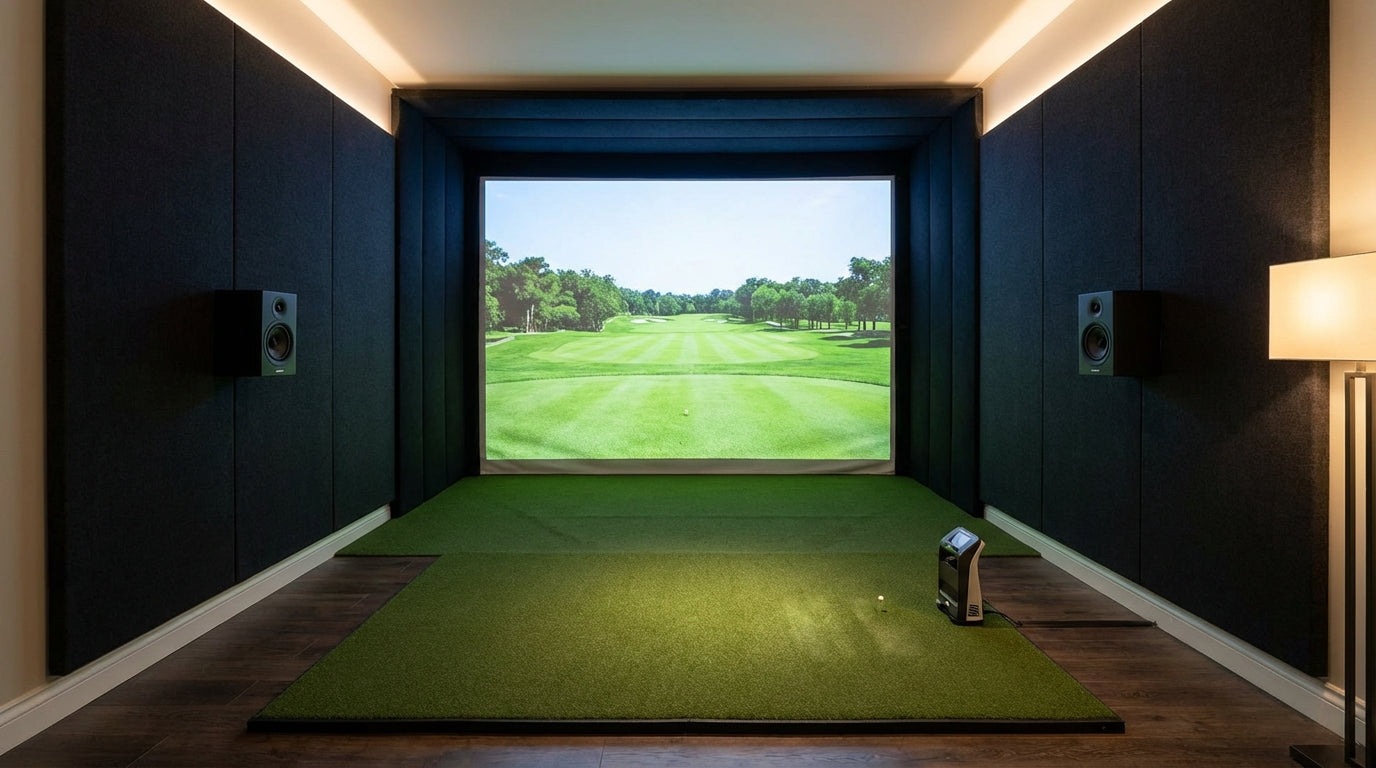
Standard Bluetooth speakers introduce up to 300 milliseconds of audio lag. In your golf simulator bay, that means the crack of a driver sounds nearly a third of a second after your eyes see the impact. (Source: Gaming Earbuds / Turtle Beach latency comparison, 2025) Your brain picks it up even if you can't name it — the immersion breaks and the course stops feeling real. The good news: dialing in your golf simulator room speaker setup is entirely doable once you know what actually matters.
This guide covers Bluetooth vs. wired audio, speaker placement specific to simulator bays, acoustic treatment basics, and real budget numbers for every system tier.
Why Audio Gets Ignored (And Why That's a Mistake)
When you're building a simulator bay, the budget goes toward the launch monitor, projector, and impact screen — as it should. Audio feels optional. You can hear the sounds through whatever Bluetooth speaker you already own, so it gets pushed to the "figure out later" pile.
Building one now? Carl’s Place Preferred impact screen — from $299.
But simulator software like GSPro, E6 Connect, and TGC 2019 has professionally mixed audio — birdsong, wind, crowd ambience, impact sounds — all engineered for immersion. Thin or out-of-sync audio doesn't just disappoint; it actively undermines what the software is built to deliver.
The market reflects this shift. The global golf simulator market was valued at $1.74 billion in 2024 and is projected to reach $3.81 billion by 2033 at a 9.1% CAGR. (Source: Straits Research, Golf Simulators Market Report 2024) More complete bay buildouts mean audio is increasingly a line item, not an afterthought.
Bluetooth vs. Wired: The Latency Problem Nobody Talks About
This is where most builders make the wrong call. Bluetooth is convenient — no wires, easy pairing, portable. For a simulator bay, though, the tradeoff matters more than it does for casual listening.
Standard Bluetooth audio runs 100–300 milliseconds of latency. aptX Low Latency protocol can cut that to roughly 34ms. Wired connections operate at near-zero latency. (Source: Gaming Earbuds / Turtle Beach latency comparison, 2025) For casual practice, the lag is tolerable. For competitive play or when you're relying on audio feedback to calibrate your swing, that sync mismatch gets old fast.
Bluetooth vs. Wired Speakers for Golf Simulator Bays
Swipe to compare →
| Factor | Bluetooth Speaker | Wired/AV System |
|---|---|---|
| Audio Latency | 100–300ms (34ms with aptX LL) | ~0ms (negligible) |
| Typical Price Range | $50–$350 | $200–$1,500+ |
| Installation Complexity | Plug-and-play, no cables | Receiver + speaker wire routing |
| Sound Quality Ceiling | Good (lossy compression) | Excellent (lossless, full range) |
| Subwoofer Support | Rarely included | Standard in 2.1 and 5.1 kits |
| Best Use Case | Casual, space-limited bays | Dedicated simulator rooms |
| Echo/Room Interaction | Less sensitive to room acoustics | Requires acoustic treatment to shine |
When Bluetooth Is the Right Call
Multi-use rooms, rented spaces, or bays where running wire isn't practical. A quality Bluetooth speaker in the $150–$350 range (Sonos Roam, JBL Xtreme 3) gives solid stereo sound with zero installation. If latency bothers you, look for aptX LL support on both the speaker and your audio source.
When Wired Wins
Dedicated rooms, finished garages, basements. A 2.1 stereo system — two bookshelf speakers plus a powered subwoofer — in the $250–$500 range transforms the bay experience. Going all-in, a 5.1 AV receiver setup with surround channels creates cinema-level immersion. Expect $700–$1,100+ for a complete quality 5.1 system.
Speaker Placement in a Golf Simulator Bay
Good placement matters as much as good hardware. Simulator bays are unusual rooms — you stand at the back and hit toward a screen at the front. Standard home theater placement guidelines don't map perfectly.
Front Stereo Pair
Place left and right speakers at roughly ear height — 4 to 5 feet off the floor — on either side of the screen or enclosure. Angle them 15–20 degrees inward toward your hitting position. This puts the soundstage directly in front of you, right where the course visuals are.
Subwoofer
Low frequencies are non-directional, so placement is flexible. Corner placement typically adds bass reinforcement. Some builders mount the sub under the hitting mat platform for that physical thud on driver strikes. Either works.
Surround Channels (5.1 Setups)
Rear speakers go behind your hitting position at ear height or slightly above. This wraps course ambience — crowd noise, wind, weather — around you the way a real round would. It's the setup that makes first-time visitors stop mid-swing to ask what they're hearing.
The screen is doing acoustic work too
Your impact screen and enclosure are the largest soft surfaces in the bay, so they shape how the room sounds before a single acoustic panel goes up.
Browse impact screens →Fix the Room Before You Buy Speakers
Here's the part most guides skip entirely: acoustic treatment matters more than speaker quality in a reflective room. Every dollar you spend on treatment does more work than the equivalent dollar spent on hardware.
A proper home theater targets an RT60 (reverberation time) of 0.3–0.5 seconds. Rooms with RT60 above 2.0 seconds are considered highly echoic — audio blurs, dialogue muddies, and the room fights your speakers. (Source: Acoustical Surfaces — Measure RT60 & Control Reverberation Time) Typical simulator bays with concrete or hardwood floors, drywall walls, and an impact screen regularly hit 1.5–2.0 seconds untreated.
The impact screen itself actually helps — large fabric panels absorb more sound than bare drywall. But the rear wall and side walls behind your hitting position are still hard and reflective. Flutter echo between parallel walls is common in rectangular bays.
Budget Acoustic Treatment That Actually Works
You don't need a professional install. Start here:
- 2-inch acoustic foam panels on the rear wall and upper side walls. A 12-pack of 24"×24" panels covers roughly 50 sq ft and runs $40–$80.
- Heavy padded wall panels or curtains behind the hitting position. If you have enclosure side panels, they already help.
- Rubber or turf flooring also reduces floor-bounce reflection — the flooring guide here breaks down every material option.
A complete acoustic treatment for a 12×18 bay runs $300–$2,000 depending on finish level. (Source: Virtual Tee / Wolverine Low Voltage — Home Golf Simulator Cost 2026) Even the low-end investment makes a dramatic difference — budget speakers in a treated room will outperform expensive ones in a live, reflective space. For the screen-specific side of sound control, our guide on impact screen sound dampening covers what to do at the front of the room.
By the Numbers: Golf Simulator Audio Stats
Golf Simulator Audio Setup: Typical Budget by System Type
Source: Best Buy / Abt Electronics / Golf Simulator Forum community builds — Industry estimates
- 100–300ms — standard Bluetooth audio latency. aptX Low Latency cuts this to ~34ms. Wired: essentially zero. (Source: Gaming Earbuds / Turtle Beach latency comparison, 2025)
- 0.3–0.5 seconds — target RT60 reverberation time for home theaters. Untreated hard-surface simulator bays often exceed 1.5–2.0 seconds. (Source: Acoustical Surfaces)
- $300–$2,000 — typical cost range to acoustically treat a home simulator bay. (Source: Virtual Tee / Wolverine Low Voltage)
- 15 million Americans participate in off-course golf activities including indoor simulator facilities annually — driving demand for complete, immersive bay setups. (Source: National Golf Foundation)
Which System Type Is Right for Your Bay?
Here's the short version:
- Casual or shared space: Bluetooth speaker, $100–$200. No installation, no commitment. Upgrade later when the room gets serious.
- Dedicated home bay: 2.1 wired system, $250–$450. Bookshelf pair (Klipsch R-41M, Polk Audio T15) plus a powered sub. Clean, punchy, no complex receiver setup required.
- Full immersion room: 5.1 AV receiver setup, $700–$1,100+. Entry-level Yamaha or Denon AVR, five speakers, and a sub. This is the setup that stops conversation mid-round.
If you're still in the planning phase and haven't finalized your room dimensions, the room width requirements guide is worth reading before you decide where speakers will live.
The Last Piece That Ties It All Together
Audio is the thing most builders add last and wish they'd planned for first. Get the acoustics right, match the system to how you actually use the room, and place the speakers where they'll perform — not just where they're convenient.
Your screen and projector put the course in front of you. Good audio puts you on it.
If you're still dialing in your core hardware, browse the impact screen collection — the right screen is the foundation every great simulator bay is built around.
From This Guide
Sound treatment for your bay


Not sure which simulator fits your room?
The two-minute Simulator Finder Quiz checks your space and budget against every system we carry.

Keep Reading
Related guides

golf simulatorGolf Simulator Enclosure Lighting Plan: Where to Mount Fixtures So They Never Wash Out Your Screen

golf simulatorGolf Simulator Basement Conversion Checklist: The 7 Steps to Run Before You Buy Anything

DIY golf simulatorGolf Simulator Garage Build Cost Breakdown: Every Line Item at Three Budget Tiers