
golf simulator
Golf Simulator Enclosure Lighting Plan: Where to Mount Fixtures So They Never Wash Out Your Screen
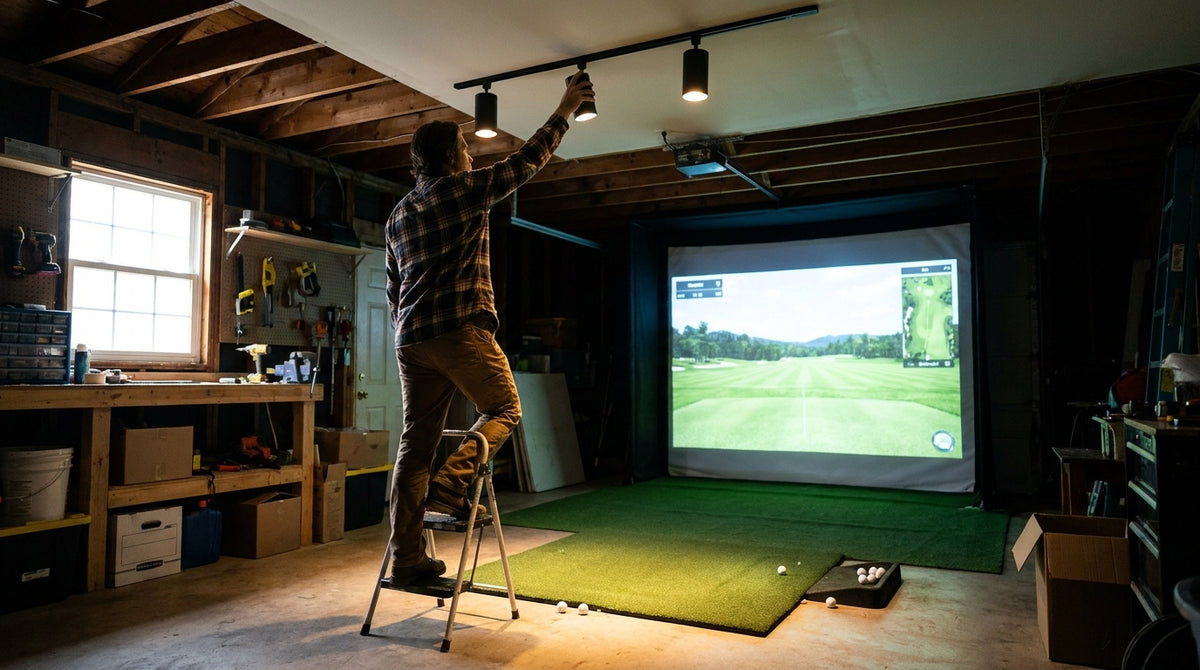
Two sim bays, same projector, same screen, same software. One looks like a small movie theater. The other looks like someone photocopied a golf course. The difference almost never comes down to the projector. It comes down to where the ceiling lights are pointed.
Here is what most builders get wrong: they finish the frame, hang the screen, mount the projector, and then light the room the way you'd light a garage. One big fixture dead center, maybe two, aimed at everything. That single decision can quietly cost you thousands, because a bright room demands 5,000+ lumens from a projector while a controlled room gets away with 2,000 (Source: Home Performance Lab, 'Golf Simulator Lighting Guide (2026)'). A proper golf simulator enclosure lighting plan is under 10% of your enclosure budget and it changes the image more than any other line item.
The Two-Zone Rule That Makes Everything Else Easy
Stop thinking about "room lighting." Think about two separate zones that happen to share a ceiling.
Zone 1 is the hitting area. This is the only place that actually needs light. You need to see the ball, the mat, your alignment, and your club. Target 50 to 100 foot-candles (500 to 1,000 lux) at the mat (Source: Home Performance Lab, 'Golf Simulator Lighting Guide (2026)').
Zone 2 is the screen area, and your goal is darkness. Every lumen that lands on your impact screen is a lumen fighting your projector for contrast. Leave a deliberate 3 to 5 foot "darkness zone" in front of the screen with nothing lighting it at all (Source: Home Performance Lab, 'Golf Simulator Lighting Guide (2026)').
The mounting geometry that makes this work: run your track 1 to 2 feet behind the ball position and aim every head back toward the player, not forward toward the screen. Light travels away from the screen instead of onto it. That one move does more for image quality than any screen upgrade.
Why aiming forward ruins everything
A fixture aimed toward the screen does three bad things at once. It washes the projected image, it puts glare on the fabric so you see texture instead of picture, and it bounces light back into your eyes at address. If you have already read our take on ambient light rejecting impact screens, you know there is no fabric that fixes bad fixture aim. Geometry first, hardware second.
Minimum Projector Lumens Required by Room Ambient Light Level
Source: Home Performance Lab, 'Golf Simulator Lighting Guide (2026)' - upper bound of each stated minimum range
Zoning your light well means you can spend less on the projector.
A controlled two-zone bay runs comfortably on a 3,000-lumen short throw like the BenQ TH671ST at $949.00. If you cannot kill the ambient light, you are shopping the BenQ LK830ST 4K at $2,499.00 instead.
Shop golf simulator projectorsWhat the Data Says About Golf Simulator Room Lighting
The numbers are unusually specific for a topic this ignored, and they all point the same direction: less light, better aimed.
Hitting zone brightness. 50 to 100 foot-candles at the mat is the target. Bright enough for high-speed launch monitor cameras, not so bright you need extra fixtures (Source: Home Performance Lab, 'Golf Simulator Lighting Guide (2026)').
Fixture output. Individual track spotlights in the 950 to 3,000 lumen range, with 3 to 6 heads, give you a cumulative 3,000 to 12,000 lumens aimed at the hitting zone (Source: Home Performance Lab, 'Golf Simulator Lighting Guide (2026)'). Note that this is aimed light, not room flood.
Screen size pushes lumens too. BenQ puts the typical minimum at 3,000 lumens for an 8 to 9 foot screen, rising to 4,000 to 6,000 for screens 9 feet and taller or rooms with more ambient light, and reports home golf simulation demand up 50% since 2020 (Source: BenQ, 'Golf Simulator Lighting: Brightness, Ambient Control and Tips'). Pair that with our breakdown of how many lumens you need by room and screen size before you buy either piece.
Cost context. A full lighting build runs $100 to $250 budget, $300 to $600 mid, and $700 to $1,500+ premium, against enclosure and screen costs of roughly $1,000 to $6,000 (Source: Home Performance Lab lighting cost tables). Lighting is the cheapest lever you have on image quality.
Kelvin and CRI: The Spec Nobody Reads
Buy fixtures at 4,000K to 5,000K with a CRI of 90 or higher. Skip 6,500K "cool daylight" bulbs, which read harsh in a small bay, and avoid anything under 80 CRI because it distorts on-screen color (Source: Home Performance Lab, 'Golf Simulator Lighting Guide (2026)').
Flicker matters as much as color. Undersized LED drivers pass AC ripple through as flicker, which your eye may ignore but a swing camera will absolutely record as banding (Source: LED and Lighting Info / Warehouse-Lighting fixture specifications). If you are running a Carl's Place Swing Camera Kit, from $449.95, flicker-free is not optional.
Does Your Launch Monitor Even Care?
This decides whether your lighting plan has to serve three masters or two.
Some overhead units carry their own illumination. The Trackman iO uses an embedded 810 to 850 nm infrared system, which means it does not need your room lights at all. Camera-based overhead units like the Uneekor family instead want stable, controlled room light and get genuinely finicky in dim or fluctuating conditions (Source: Trackman iO / Uneekor product documentation via industry retailers).
So if you are building around a Uneekor XO2, from $10,999.00, your hitting zone light has to be consistent shot to shot, which is another argument for dedicated fixtures over whatever the garage came with. A radar unit on a tripod like the FlightScope Mevo Gen2 at $1,299.00 is far less fussy and lets you run the room darker.
Garage vs Basement: The One Spec That Splits the List
Same bay, same plan, different fixtures. LEDs going into an unheated garage should be rated to at least -20C / -4F. Standard indoor-rated drivers can fail to start reliably in the cold and degrade faster below their tested range (Source: LED and Lighting Info / Warehouse-Lighting fixture specifications).
Garages also come with a second problem: windows and the door itself. Blackout treatment per window runs $20 to $60 at the budget tier, and it buys you more image than an extra 1,000 projector lumens would. Our garage build cost breakdown slots lighting into the full budget picture, and the basement conversion checklist covers the opposite case, where you start dark and only need to add what you want.
Golf Simulator Lighting Parts List and Specs by Budget Tier
Swipe to compare →
| Component / Spec | Budget tier | Better tier |
|---|---|---|
| Track lighting system | $30-$60 | $80-$150 |
| Flicker-free LED bulbs (90+ CRI) | $25-$50 | $50-$100 |
| Dimmer switch (zoned control) | $15-$25 | $40-$60 |
| Snoots / glare shields | $5-$15 (DIY) | $20-$40 |
| Screen-area accent strip lights | $15-$30 | $40-$80 |
| Blackout treatment per window | $20-$60 | $100-$200 |
| Total lighting build | $100-$250 | $300-$600 |
| Hitting-zone target light level | 50-100 fc (500-1,000 lux) | 50-100 fc (500-1,000 lux) |
| Color temperature | 4,000K-5,000K | 4,000K-5,000K |
| Spotlight heads | 3-5 on one 4 ft track | 6-8 on dual tracks 4-5 ft apart |
| Garage cold rating | Indoor-rated (heated space only) | Rated to -20C / -4F |
Put the Hitting Zone on a Dimmer, Not a Switch
One circuit, two very different jobs. During simulated play you want the task lights over the mat dialed back to 60 to 70%. For practice sessions and swing-camera work you want them at full brightness (Source: Home Performance Lab, 'Golf Simulator Lighting Guide (2026)').
A $15 dimmer gets you both. A plain switch forces you to pick one, and most people pick "too bright" and then blame the projector.
Your Build Order
Frame, then screen, then lighting, then projector. Lighting before projector, because the room's light level sets the lumen spec you are shopping for, not the other way around. Decide your zones first and you may save yourself a four-figure projector upgrade.
And if you are still choosing fabric, a high-contrast gray surface buys back some of what a bright room takes away. The Carl's Place High-Contrast Gray Impact Screen, from $449.95, holds black levels better in rooms you cannot fully darken.
Ready to build the screen wall your lighting plan is protecting? Browse all GolfingSim impact screens and match your fabric to the room you actually have, not the blacked-out studio you wish you had.


Not sure which simulator fits your room?
The two-minute Simulator Finder Quiz checks your space and budget against every system we carry.

Keep Reading
Related guides

golf simulatorGolf Simulator Basement Conversion Checklist: The 7 Steps to Run Before You Buy Anything

DIY golf simulatorGolf Simulator Garage Build Cost Breakdown: Every Line Item at Three Budget Tiers

enclosure frame heightGolf Simulator Ceiling Height Requirements for a Garage Build: The Real Numbers Before You Buy a Frame