
best golf simulator for winter practice indoors
Best Golf Simulator for Winter Practice Indoors: What Actually Works When It's Cold
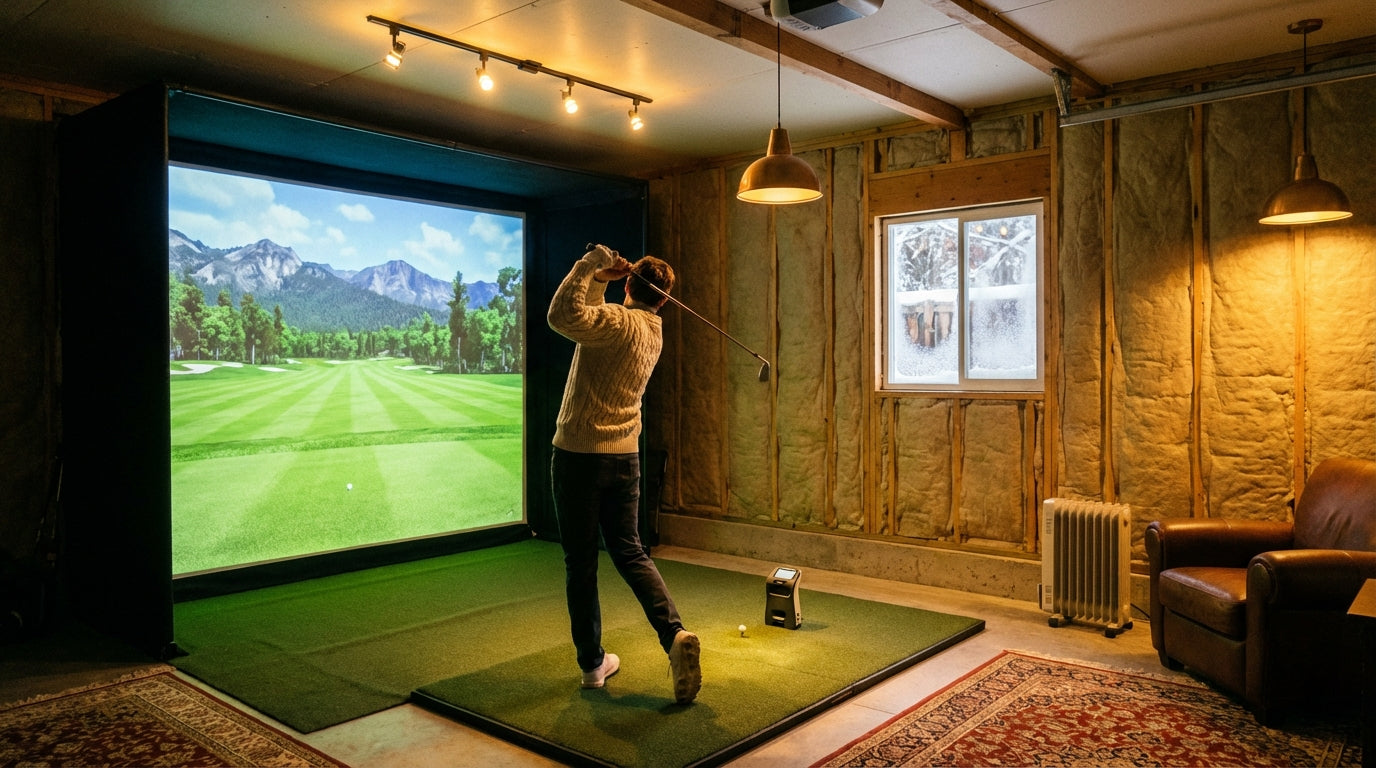
There are 47.2 million Americans playing golf in 2025. A 38% jump from pre-pandemic 2019 — a record high. And a big chunk of those golfers aren't stopping when November arrives. Over 19 million people now participate exclusively in off-course golf, using simulators and indoor ranges to keep swinging through every season. (Source: National Golf Foundation (NGF))
If you've been telling yourself you'll get back to it in the spring, you're handing 5 months of reps to golfers who never stopped. A home simulator for winter practice isn't a luxury anymore. It's the tool that separates players who improve year-round from players who restart from scratch every April.
This guide covers exactly what makes a winter indoor setup work — which space wins for cold weather, what low temperatures do to your hardware, what you actually need to buy first, and why winter might be the smartest time to pull the trigger.
Building one now? Carl’s Place Preferred impact screen — from $299.
Why Winter Is the Best Time to Buy a Golf Simulator (Not Spring)
This surprises most people. Spring feels like the obvious time to shop for golf gear. But if you wait until March, you've already missed the best deals of the year — and you've already lost four months of practice time you can't get back.
The October–December off-season window consistently delivers the biggest discounts in the annual buying cycle. We're talking up to $4,000 off launch monitors like the Foresight GCQuad and $2,500 off premium packages, as retailers clear inventory before the outdoor season kicks back in. (Source: MyGolfSpy / Golf.com / SkyTrak 2025–2026 deal reporting)
By January, good inventory is thin. By March, you're paying full spring pricing. And you've already missed the window for the build itself.
Winter installation has a practical advantage too: you have the time. No weekend rounds competing for your Saturday. No reason to procrastinate. Build it in November or December, get dialed in through January, and you're ahead of every golfer who waited.
Garage vs. Spare Room: The Decision That Matters Most in Winter
This is the most consequential setup choice you'll make — and cold weather makes it more important than any other time of year.
A finished spare room or basement is almost always the easier winter build. It's already climate-controlled. Heating and insulation costs are effectively zero. The space naturally stays above the 40°F threshold that launch monitor sensors need to operate accurately — without any extra work on your part. If you're going this route, this complete guide to converting a spare room to a simulator walks through every step of the prep process.
A garage requires real prep for winter. Uninsulated walls, a large door gap, and no existing HVAC mean you're starting cold. Plan for a ceiling-mount electric heater or infrared radiant system, plus $500–$2,000 in insulation and door sealing. Real money — but you get dedicated space, high ceilings, privacy, and a structure built to absorb swing noise.
Garage vs. Spare Room: Winter Golf Simulator Setup Comparison
Swipe to compare →
| Factor | Garage | Spare Room / Basement |
|---|---|---|
| Typical ceiling height | 7–9 ft (often marginal) | 8–10 ft (often ideal) |
| Heating challenge | High — uninsulated walls, large door gaps | Low — already conditioned space |
| Recommended heater type | Ceiling-mount electric or infrared radiant | Portable electric or mini-split |
| Minimum usable footprint | 12 ft L × 10 ft W × 8.5 ft H | Same minimums, easier to meet |
| Hardware cold-weather risk | High — launch monitor sensors sensitive to <40°F | Low — stays above threshold naturally |
| Typical insulation cost to add | $500–$2,000 (walls + ceiling + door sealing) | $0 (already insulated) |
| Privacy / noise isolation | High (separate structure) | Moderate (shared walls) |
| Average setup premium vs. indoor | +$500–$2,500 (heating + insulation) | Minimal added cost |
The Cold-Weather Hardware Problem Nobody Warns You About
Most setup guides completely skip this: launch monitors don't like cold air.
Camera-based and radar-based sensors are both temperature-sensitive. Below 40°F, you get tracking errors, delayed calibration, and sometimes the unit won't initialize cleanly at all. Leave your monitor in an unheated garage overnight when it's 20°F outside and you may be looking at a long warm-up period before it reads accurately — if it boots correctly at all.
The fix is simple but often ignored: store your hardware inside between sessions. A well-heated garage that stays above 50°F is probably fine. An uninsulated space that drops near-freezing overnight? Real risk, real headache.
Cold air affects more than just the launch monitor. Humidity swings — cold outside air warming up rapidly inside — can stress projector optics and screen material over time. For the full breakdown on managing environmental control across all four seasons, this guide on golf simulator room temperature and humidity control is worth reading before you finalize your build.
What You Actually Need for a Winter Indoor Setup
You don't need a $50,000 dedicated room. The most popular DIY winter builds land between $5,000 and $15,000 — mid-tier setups that give you everything you need to practice seriously. Here's what actually matters:
- Impact screen — The most important piece in the whole setup. A quality screen handles real ball impact without tearing and gives you a clean, accurate projection surface. This is where to invest first, not last.
- Launch monitor — Budget tier: Garmin R10 or Bushnell Launch Pro. Mid tier: SkyTrak+. Premium: Uneekor EYE XO or GC3. Match your monitor to your simulator software.
- Hitting mat — Especially critical in a garage with cold concrete underneath. A thin mat will wreck your wrists over a full winter of swings. Get at least 1.5 inches of cushion.
- Short throw projector — Works better in tight spaces where ceiling mount distance is limited by the room's depth.
- Heater, if garage — Ceiling-mount electric or infrared radiant. Never propane indoors.
What you can skip to start: full frame enclosure, side netting, flooring upgrades. Get the core hitting zone right first. And before you buy a screen, make sure your space can support the right size — this screen sizing guide is a five-minute read that prevents a $500 return mistake.
By the Numbers: What the Data Says
6.2 million Americans used golf simulators in 2023 — a 73% increase since 2019. That surge is concentrated in cold-climate northern markets where outdoor play shuts down for 4–5 months every year. Winter indoor practice isn't a fringe thing — it's driving record participation numbers. (Source: National Golf Foundation (NGF))
19 million Americans now participate exclusively in off-course golf. Simulators, indoor ranges, tech-forward venues. This is a parallel industry running alongside traditional golf year-round — not a niche, not a novelty. (Source: National Golf Foundation (NGF))
The global golf simulator market was valued at $2.12 billion in 2025, projected to reach $4.12 billion by 2033 at 8.7% CAGR. Quality equipment prices are not heading down. Waiting to buy doesn't help you financially or skill-wise. (Source: Grand View Research)
A full home simulator build runs $1,000 to $60,000+, with the most popular DIY winter setups landing at $5,000–$15,000. That's real hardware, real software, real feedback — at a price point most serious golfers can reach. (Source: Golf Joy / Virtual Tee / Love Live Golf 2026 buyer guides)
Home Golf Simulator Setup Cost by Tier (2026)
Source: Golf Joy, Virtual Tee, Love Live Golf 2026 buyer guides
Stop Giving Up 5 Months of Reps Every Year
In northern climates, winter costs you roughly five months of outdoor golf. Five months of swing path drift. Five months of losing feel on your short game. Five months of your competitors quietly getting better while you wait for April.
A winter indoor simulator setup doesn't have to be massive or expensive to be effective. A quality impact screen, a reliable launch monitor, and a space that stays warm enough to swing in — that's the whole formula. Everything else can be added over time.
The impact screen is the piece most people underinvest in. It's what determines projection quality, shot feedback feel, and how long your setup holds up under real ball impact through a full winter of use. Get that piece right and everything else clicks into place.
Browse impact screens built for home simulator setups →
Related reading: Best Indoor Putting Green for Home Simulator: Stimp Speed, Size, and What Actually Matters


Not sure which simulator fits your room?
The two-minute Simulator Finder Quiz checks your space and budget against every system we carry.

Keep Reading
Related guides

golf simulatorGolf Simulator Enclosure Lighting Plan: Where to Mount Fixtures So They Never Wash Out Your Screen

golf simulatorGolf Simulator Basement Conversion Checklist: The 7 Steps to Run Before You Buy Anything

DIY golf simulatorGolf Simulator Garage Build Cost Breakdown: Every Line Item at Three Budget Tiers