
golf simulator
Golf Simulator Impact Screen Tensioning System Guide: Get the Tension Right or Pay for It Later
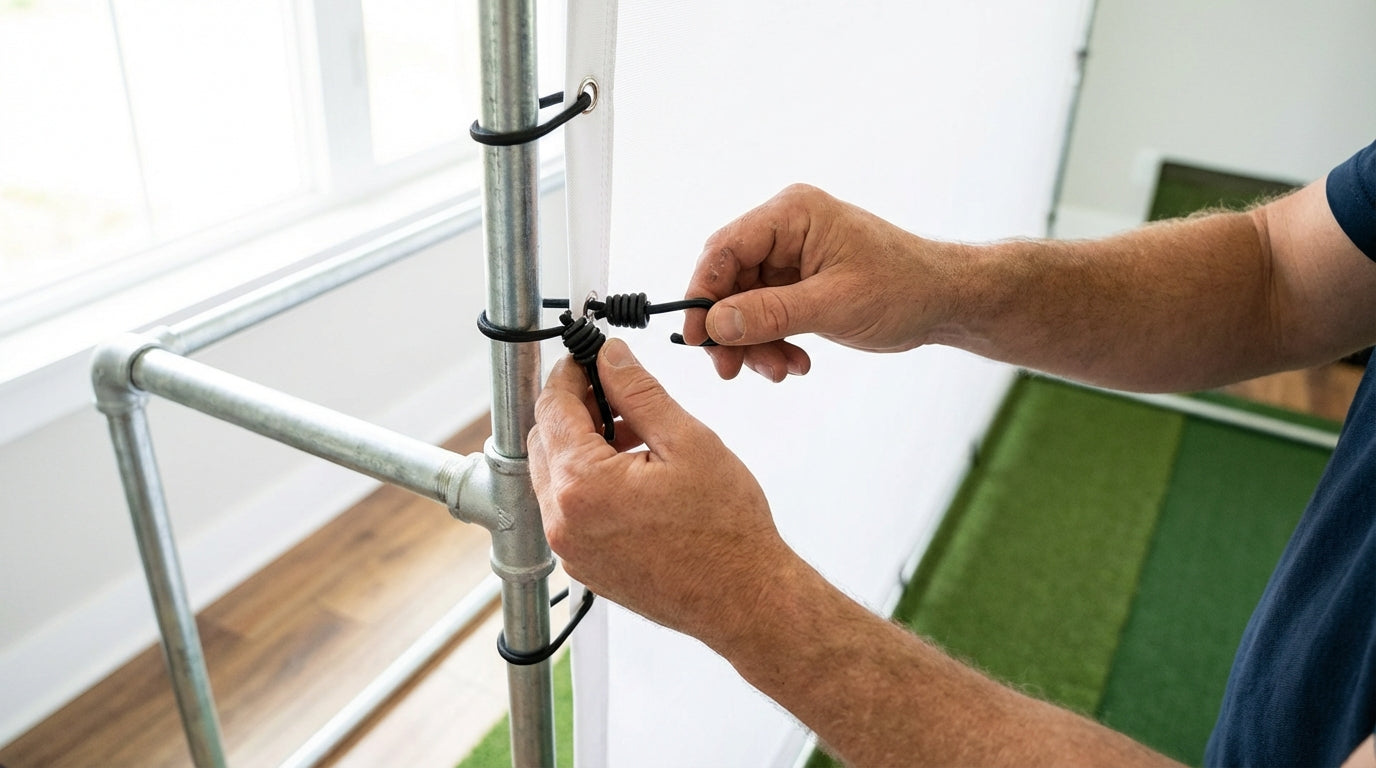
Most people building a home golf simulator spend weeks researching the projector, the launch monitor, the software. Then the screen arrives, they stretch it onto the frame, and move on. Tension? Never thought about it.
Here's the problem with that approach: a correctly tensioned impact screen should allow a driver-struck ball to bounce back 1–3 feet from the screen surface. That's the universally cited industry standard for safe, optimal tension. (Source: Carl's Place Blog; PlayBetter) Get outside that window in either direction and you're either creating a dangerous rebound situation or concentrating wear that'll cost you money years before it should.
This golf simulator impact screen tensioning system guide covers everything: the physics of screen tension, how to diagnose over- and under-tensioned screens, and exactly how to achieve even tension regardless of which attachment system you're using.
Why Tension Is the Most Overlooked Variable in Your Simulator Build
Impact screens aren't passive objects. Every ball strike transfers energy to the screen, which has to absorb it, convert it to a controlled rebound, and redistribute that stress across the entire surface. Tension is what makes that redistribution happen evenly.
When tension is uneven — tight on one side, sagging on another — every impact stress concentrates at the tight spots. Those spots fatigue faster, grommets stress more, and material breaks down well ahead of its rated lifespan.
If you've ever seen a screen with a worn sweet spot in the middle while the edges look fine, you've seen under-tension damage in action. That's repeated impact force hammering the same few inches of loosened fabric instead of spreading across the full surface.
Over-Tensioned vs. Under-Tensioned: What Each Actually Does
Too Tight
An over-tensioned screen looks perfect — drum-tight, no wrinkles, laser-flat. But you're setting yourself up for problems.
First, the rebound. A ball striking an over-tensioned screen can bounce back 5–6 feet or more — fast, unpredictable, and potentially at head height. Second, all that stress concentrates at the grommet holes. Grommets on commercial-grade screens are machine-installed every 12 inches on all four sides specifically to distribute tension load evenly and prevent hotspot tearing. (Source: Virtual Golf Simulator) Over-tension asks those anchor points to hold more than they were designed for. The screen tears — usually starting at the grommets.
Too Loose
An under-tensioned screen sags in the middle. The obvious issue is image quality — wrinkles distort the projected image noticeably. The bigger issue is durability.
A sagging screen has a low-tension zone in the center where every ball strike concentrates. Instead of distributing impact force across the full surface, it hammers the same area over and over. This is the number one killer of budget screens — not ball speed, not material quality, but improper tensioning that turns the center of your screen into a punching bag.
If you're already dealing with sag on an installed screen, Golf Simulator Impact Screen Wrinkle Fix Tips has specific remedies by attachment system type.
By the Numbers: What the Data Says About Golf Simulator Impact Screen Tension
Let's get into the actual data — because the numbers here are worth understanding before you buy or adjust anything.
Premium screens are rated for 150,000+ ball strikes before showing significant wear. Entry-level screens show significant wear after just 20,000–50,000 impacts. (Source: Canvas ETC – Golf Impact Screen Durability Guide) Proper tensioning is what allows premium screens to actually reach that ceiling. Over-tensioning concentrates stress at grommets and cuts lifespan dramatically regardless of how much you spent on the screen itself.
Corner-only attachment cuts lifespan 40–60%. DIY installations that attach only at corners or use fewer anchor points than the grommet spacing was designed for can reduce screen lifespan by an estimated 40–60% regardless of screen material quality. (Source: Virtual Golf Simulator) The grommet-every-12-inches standard exists precisely to distribute that load — skip those anchor points and you've voided the design.
Material thickness changes your tension target. Premium poly spacer screens (approx. 3mm thick, dual-layer with nylon cushion) are rated to withstand ball speeds up to 250 mph, vs. 180 mph for standard single-layer polyester — a 39% difference in impact tolerance. (Source: Virtual Golf Simulator; Canvas ETC) Thicker material requires slightly less tension to achieve safe rebound characteristics, so the right tension depends on which screen type you actually have.
UV degradation makes tension more critical, not less. Polyester fibers lose approximately 15% of their tensile strength after 500 hours of simulated UV exposure. (Source: Journal of Applied Polymer Science, Smith et al. 2018, cited in Canvas ETC) A UV-weakened screen near windows or skylights requires less over-tension to tear at grommets — making proper tension setup even more important in sunlit rooms.
Golf Impact Screen Rated Lifespan by Tier (Ball Strikes Before Significant Wear)
Source: Canvas ETC Golf Impact Screen Durability Guide; RSGolf / Optishot Impact Screen Guide; industry product specs
Your Impact Screen Tensioning System Guide to Attachment Options
Your tensioning technique is directly tied to your attachment method. Not every system gives you the same adjustability — and some are far more forgiving of first-time installs than others. Here's how they stack up.
Golf Impact Screen Attachment System Comparison
Swipe to compare →
| Attachment System | Tension Adjustability | Image Flatness | Grommet Stress Risk | Best For |
|---|---|---|---|---|
| Ball Bungees (6"/9"/11") | High — easy to swap lengths | Good — minor ripple possible | Low — elastic absorbs shock | DIY builds, first-time installs |
| Grommets + S-Hooks + Frame | Medium — manual repositioning | Very Good — firm and flat | Medium — rigid attachment | Dedicated simulator rooms |
| Sleeve / Hem (rod pocket) | Low — set at install | Excellent — no grommet points | Very Low — distributed load | Permanent ceiling-hung installs |
| Velcro Strap Systems | High — infinite micro-adjustment | Good | Low | Rental spaces, portable setups |
| Ratchet Strap + Border Frame | Very High — precise dial-in | Excellent | Low if padded | Commercial / high-volume use |
For a deeper breakdown of every major attachment method and its install tradeoffs, see the Golf Simulator Impact Screen Attachment System Guide.
Step-by-Step: How to Achieve Even Tension Across Your Screen
1. Start from the Center, Work Outward
Don't anchor one corner and pull to the opposite. Attach center points on all four sides first, then work outward toward the corners in stages. This distributes tension evenly from the start and prevents the screen from shifting or torquing during install.
2. Use Equal-Length Attachment Points on Each Side
If you're using ball bungees, every bungee on a given side should be the same length. One bungee that's an inch shorter than its neighbor creates a localized high-tension zone you won't notice — until a grommet tears mid-session.
3. Test Rebound Before Final Tightening
Before committing to final tension, hit a few soft chip shots toward the screen center and watch the rebound. 1–3 feet is your target. Ball bouncing back hard and fast? Loosen everything one step. Screen barely rebounding and sinking into the impact? Add tension. Don't finalize until you're in the window.
4. Check Flatness With a Projected Image
Project a solid grey or white test pattern and look for distortion across the full surface. A properly tensioned screen should be flat with minimal wrinkling. Pay attention to edges and corners: if they're pulling tight while the center sags, your corner attachment points are carrying too much load relative to the midpoints.
5. Re-Check After 100 Strikes
New screens settle after initial use. Material stretches slightly, bungees compress, and tension changes. Recheck your rebound test after the first 100 ball strikes and make small adjustments. This is normal — plan for one short tuning session after break-in.
How Screen Material Changes Your Tension Target
One thing most installation guides skip: your ideal tension isn't the same for every screen material. A single-layer polyester screen requires more tension to achieve the same flatness as a thicker poly spacer screen. And because thinner screens have less tensile strength to begin with, the margin for error on over-tensioning is much narrower.
If you're shopping for a new screen and want to understand how material quality affects both tension behavior and long-term durability under repeated impact, the Golf Simulator Screen Material Durability Comparison lays out exactly what each tier handles differently.
Get the Screen Right, Then Tension It Right
Tensioning only matters if you have a screen worth tensioning. A premium screen properly installed will outlast three budget screens stretched onto the same frame with the same bungees. That math pays for itself fast.
If you're still shopping — or wondering whether your current screen is worth the setup effort — browse the Carl's Place impact screen collection at GolfingSim. These are the screens with the grommet spacing, material quality, and build tolerances that make proper tensioning achievable — and that can reach 150,000+ ball strikes when installed correctly.
One good screen. Properly tensioned. Properly anchored. That's the whole game.
Not sure which simulator fits your room?
The two-minute Simulator Finder Quiz checks your space and budget against every system we carry.


Keep Reading
Related guides

golf simulatorGolf Impact Screen Max Ball Speed Rating: What Your Screen Really Survives at 110+ MPH

corner setupGolf Simulator Impact Screen for a Corner Setup: How to Angle It Without Wrecking Your Bounce-Back

golf simulatorGolf Simulator Impact Screen for a Shed: How to Size, Hang, and Tension It Right